I cannot run or create jobs?
User is trying to regenerate the system model but the dialog is stuck at step 4: trying to create the job to recreate index views. Also issue produces an error message when trying to execute stored procedure such as RecreateIndexedViews with messages such as.

Error messages like this, or other similar error messages, meaning that you cannot access other database objects because you don’t have the right permissions.
FIX: When setting up the database you have to uncomment out 1 line in each CreateJob and RunJob that add the following:

This allows the procedure to run as the service account which should have sysadmin rights on the SQL server. If you do not have the database set to trustworthy (find the code in any upgrade script at the top) then, even if you allow the user account to be impersonated through active directory, the SQL box will still deny access to database objects not in the source database of the procedure call.
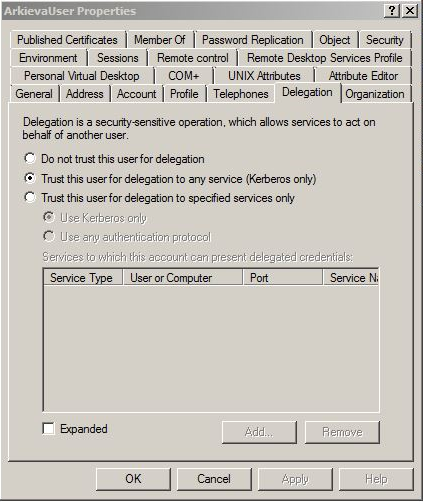
In addition, (see image) it’s the SS of active directory settings for the service account. In order for the execute as statement to work you need to configure the user account to be trusted for delegation. To reiterate, (1) uncomment out line 1 in each CreateJOB and RunJob, then (2) check to make sure the database is set to trustworthy.

Related Articles
Run LP Remotely job not working?
You need elevated privileges to execute the Create Job and Run Jobs. If these elevated privileges are not set, you will not be able to run jobs remotely in the LP.How do I manually set the impersonation account to run Arkieva services?
When installing the Arkieva application as another user than the service account, the Service account will not have access to the Message Queues, which must be added afterwards. Please watch this video to learn how. Also, change the Log On As account ...I am not able to create Jobs within the application?
Make sure the user has dbo permissions or ddl admin.Best Method is not showing when run as a job?
The reason Best Method is not showing when run by a Job is because of the service account. Give the service account full access to all data in security, then try running the job again.LP Run status is Unknown?
If running an LP gives the solution status of Unkown, the unknown status means there is something wrong with the formulation and it did not get a result from the solver. The solution is to check the input data and make sure its loaded correctly.