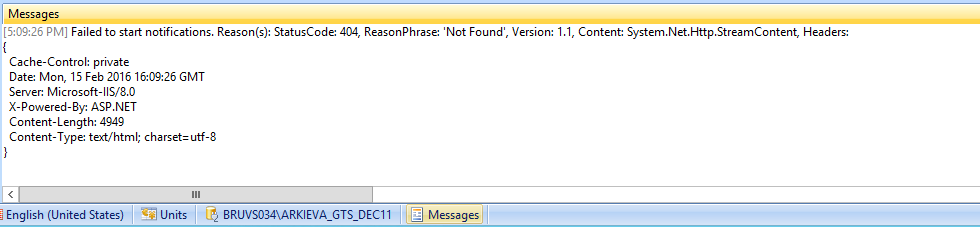
Notifications fail to start?
Most likely a misconfiguration. f you get this error, test http://cit-arkievaprd/Arkieva/API. This is the path you should have entered when installing the Fat Client. It is stored in “C:\Program Files\Arkieva\Zemeter.NET.exe.config”.
Look for: <add key=”ApiRootUrl” value=”http://cit-arkievaprd/Arkieva/API/” />
Related Articles
How do I force an alert to fire?
Copy and paste the following URL into Google Chrome and replace Alert ID with the ID of the Alert you want to fire. http://arki-dev/Arkieva/api/v1/alerts/triggers?dbId=b3d3aff7-9ce6-49a8-99c9-a63272d8a84a&alertId=Alert ID You can find the Alert ID in ...How do I get data alert trigger times?
Use a postman program that allows for saving of Web API calls to get data alert trigger times. First using the following URL to get the Calendar Event ID, and the Database ID. http://LocalHost/arkieva/api/v1/config/database/ Then copy and paste the ...SQL Tools fail during installation of Arkieva?
The SQL tools part of the installation is related to two programs: Microsoft ODBC Driver 11 for SQL Server' (msodbcsql.msi) and 'Microsoft Command Line Utilities 11 for SQL Server' (MsSqlCmdLnUtils.ms) There are most likely higher versions of these ...I can't e-mail an Advanced Report?
Execute the job & find the error in the dbo.Log. Save to path: keep in mind that this will store your file on the same server the Zemeter Job Service is executed. Parameters for Advanced Report: Buggy, check dbo.Log. Syntax should be: ...How do I verify installation of localdb?
First, you must be logged into the owner account before continuing with the installation verification. Connect in SSMS to the instance “(localdb).\Arkieva”. Alternatively, if you don’t have access there: Open cmd promt (administrator) on the server ...