Demand Planning Introduction

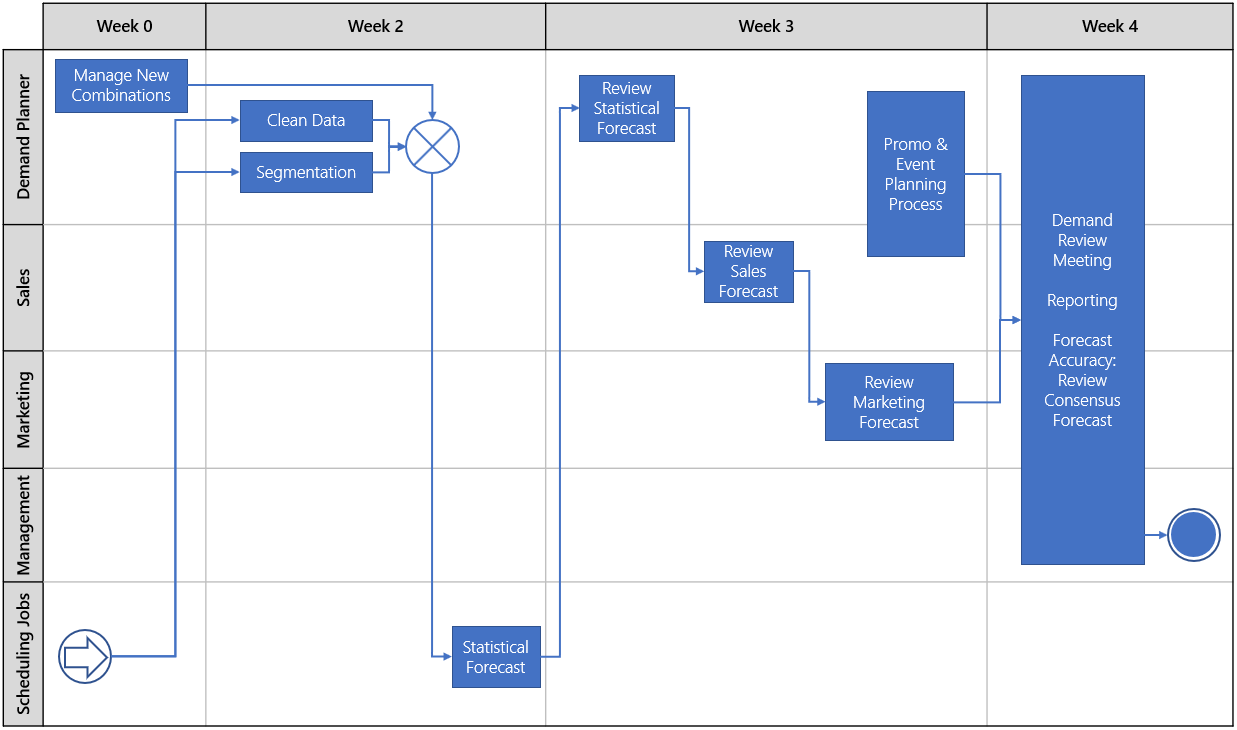
The Demand Planner creates a collaborative demand planning process for a cross-functional demand planning process for working towards one common goal.
Benefits of the Arkieva Demand Planner Solution:
- 15% less inventory
- 17% higher perfect order fulfillment
- 35% shorter cash-to-cash cycle times
- 90% fewer stockouts
Key Demand Planning Software Features
- Causal Forecast: Enables business to analyze a wide variety of external factors to identify those that influence their business directly as leading indicators.
- Collaboration: Collects corrective inputs from team members in ways most convenient for them: web, Excel or offline desktop application.
- Closed and Open Sales Orders (ERP and Anomalies): The demand planning process begins with extracting data from your ERP system. We get the closed and open sales orders, transaction data, master data from the ERP system, then we run anomaly detection on the data and identify any holes in the data.
- Outlier Correction (Adjust History): And we run through some outlier detection to see if any anomalies have been detected from a statistical standpoint. Planners are then allowed to manually go into the system to adjust the history to try to correct these anomalies.
- Life Cycle Management: Where Arkieva differs from ERP is ERP is a system of record that represents what happened in the past. Arkieva is a planning tool that gives planners the flexibility to manipulate data. Arkieva allows you to look at your entire portfolio of products that are being sold and make an accurate plan from that information. This type of data manipulation includes new products, Realignments of products or customers, and Promotion Planning.
- Statistical Forecast (Segmentation, Machine Learning, Leading Indicators)
- Performance Management: Updates actual metrics and continually highlights potential disruptions in orders, shipments, and inventories.
Demand Planning Documents
- Realignments: Generate new characteristic value combinations based on existing characteristic value combinations and copy data from the source combinations to new ones.
- Segmentation: Helps organizations make sense of what is important to the business based on historical sales, revenue and ordering patterns.
- Sentiment Analyzer: Provides real-time social monitoring to help you react in real-time to marketplace changes that result from social interactions to improve your forecasts.
- Statistical Forecast: Generates a baseline forecast with a level of detail and aggregation meaningful to each individual user.
- Forecast Methods: Create a custom method.
Demand Planning Process
Forecast archivation & lagging
Lag Tables: Keeping Data Consistent\ Modern forecasting processes typically use several inputs such as statistical forecasts, sales overrides, marketing overrides, management input, backlog information, and econometric trends to develop a demand plan. The end-result is a combined forecast that functions as a pooling device; much like investors who create diversified portfolios to reduce risk. The quality of this forecast is often determined by a variety of forecast accuracy formulas. These formulas usually compare what was forecasted to what actually happened and report the results in a variety of ways.
Terminology\ Imagine a business that does monthly forecast and that current date is May, 16th 2020. In this case, the following terminology is used:
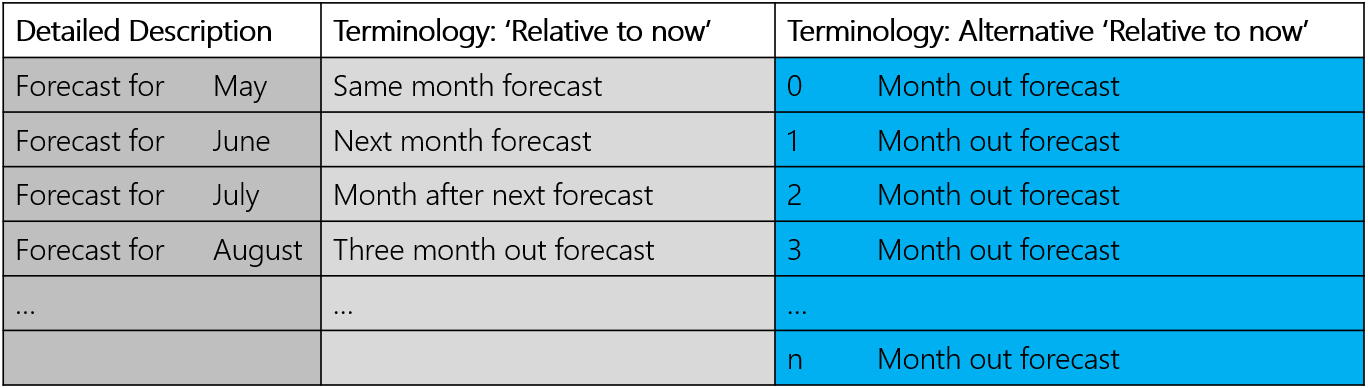
As evidenced in blue above, it is easier to think in terms of forecast n-periods-out. This is the preferred terminology among practitioners. Similarly, the following table describes the terminology used when looking at historical data. Imagine we have access to various versions of May forecast based on when that forecast was created. Review the table below:
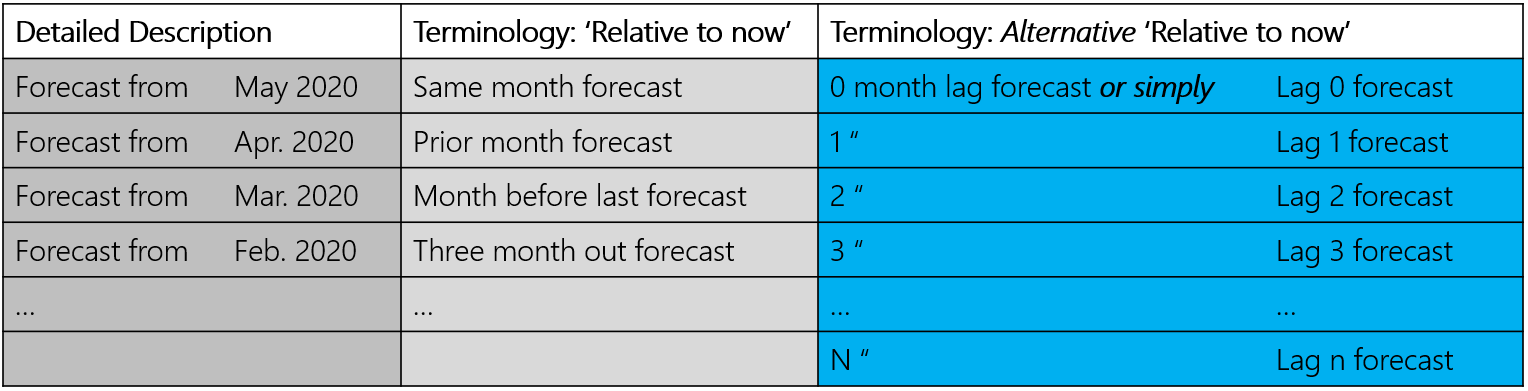
The examples above are for a business that forecasts in monthly buckets. However, if we replace the word month with period, the same idea can be applied to weekly or quarterly forecast as well.
We can define Lag-n forecast (or plan) as forecast for a period that was generated n periods ago (Periods could be days/weeks/months/quarters/years); this is the preferred terminology with practitioners as it allows the same understanding without having to spell out in detail what was meant.
Example: A table called Lag 2 forecast should hold forecast for all months as they were two months prior to that month. So, March’s Lag 2 forecast is as it was finalized at the end of January, April’s is as it was finalized end of February, May’s is at it was finalized end of March and so on.
Explaining Forecast Lag in Arkieva
Get to understand why your forecast lags in your supply chain planning.
{`
`}
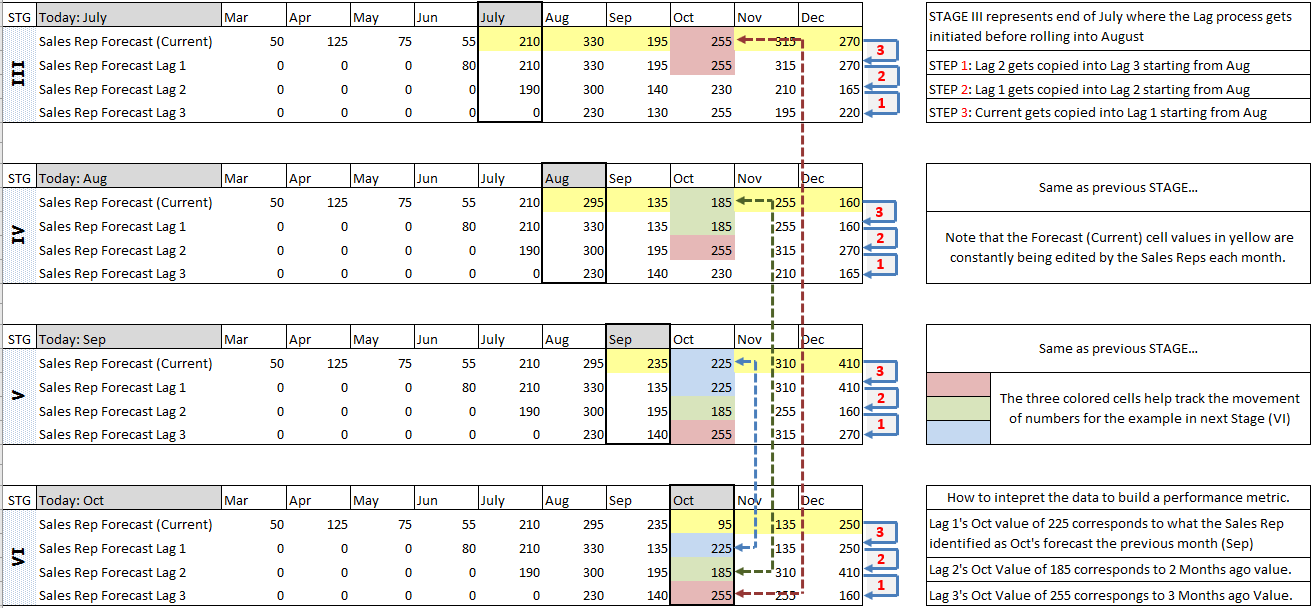
Mechanics of lag tables in Arkieva\ For forecasting accuracy purposes, users like to have a table where all historical months have the same lag data (Lag 1, or Lag 2, etc.) for easier understanding of the tables; Arkieva deploys the following table structure for this reason. Each forecast table contains one set of lag numbers per combination, per period. Arkieva tables hold information in the following way:
- Sales_Rep_Forecast (This is essentially the lag 0 table)
- Sales_Rep_Forecast_Lag_1
- Sales_Rep_Forecast_Lag_2
- Sales_Rep_Forecast_Lag_3
- etc.
In Arkieva, all data in these tables is kept relative to the Current Period. The Current Period is identified not as the name of the period, but as a relative order from period 1.
Example: If a database has 36 periods of history, then period month 37 will be the current period; i.e., during the month of April, the 37th period is April; during the month of May, the 37th period in the same database is May; etc.
Every period, the roll forward job will keep the data consistent by copying the numbers to one ID prior; if a roll forward is being run at the end of April, April will now become period 36 instead of period 37. The software will keep data consistent by moving the data from period 37 to period 36 (This is done for all periods).
A similar procedure needs to be performed for the lag tables; this is done in the following way:
- Move all data back by one period (similar to above)
- Now, for the period that has just become part of history (period 36 in example above), the data in the most lagged table needs to be copied from next lag table (this means: Lag_3 table’s period 36 will now be populated with Lag_2 table’s period 36)
- Lag_2 table’s period 36 will now be populated with Lag_1 table’s period 36
- Lag_1 table’s period 36 will now be populated with Lag_0 table’s period 36
Lags in Arkieva examples