Machine Learning
Introduction
Forecasting Evolution
Many demand planners are under constant pressure to improve their Statistical Forecast. However it is difficult for planners to figure out what level is best suitable for forecasting and how many levels to consider. Demand Planners also find it difficult to pick relevant attributes for forecasting if there are many attributes. And each percentage of forecast error brings with it a cost. Over-forecasting leads to increased inventory, product obsolescence, and resource imbalance. Under-forecasting leads to lost sales, customer service level impact, and expedited shipment.
As experts in the field of Optimization and Supply Chain Planning, Arkieva has already made the leap into Smart forecasting, making Arkieva a natural extension into Machine learning. Every Arkieva customer uses the statistical forecasting engine in one form or another, and therefore enhancing this area will provide meaningful value add to our customers. Arkieva's data scientist, previously of IBM, is leading this technology which builds on top of Statistical Forecasting by analyzing all possible forecasting pyramids and utilizing the clustering Machine Learning algorithms to pick the best possible forecasting pyramid.
Arkieva Machine Learning Forecast is an add-on service that extends the capabilities of the Statistical Forecasting engine. These services run on a remote cloud server hosted by Arkieva that has the horsepower to run the data intensive exercise and store the large volumes of data.

Arkieva offers a sophisticated simplicity to an advanced planning functionality by directly embedding the Machine Learning engine into the heart of the Arkieva application. Options and possibilities that are nearly impossible for any human to check are evaluated in minutes and feedback is provided to the user.
- Unsupervised Machine Learning engine
- Autonomous planning
- Dynamic attribute modeling
- Optimized forecast method parameters
- Create different pyramids for different segments of the business
- Smart method aggregation (vs Best Pick)
- Built in base comparison with naïve method
- Remote cloud server solution (zero IT overhead)
- Weekly and Monthly forecast modeling
- Regression Models and Leading Indicator extensions
- Planner guidance enabled platform

Normally Statistical Forecasting involves a tedious task of setting up and testing a myriad of parameters for business fit and accuracy. Business users typically set it up once and never revisit this area until there is a (serious) problem. Machine Learning helps alleviate these issues by continuously optimizing the forecasting strategy by automatically searching for forecasting possibilities, requires zero maintenance, eliminates guesswork on forecasting parameters, is supported with simulation results, and generates better forecasts by selecting the best pyramid structure that gives the most accurate forecast.
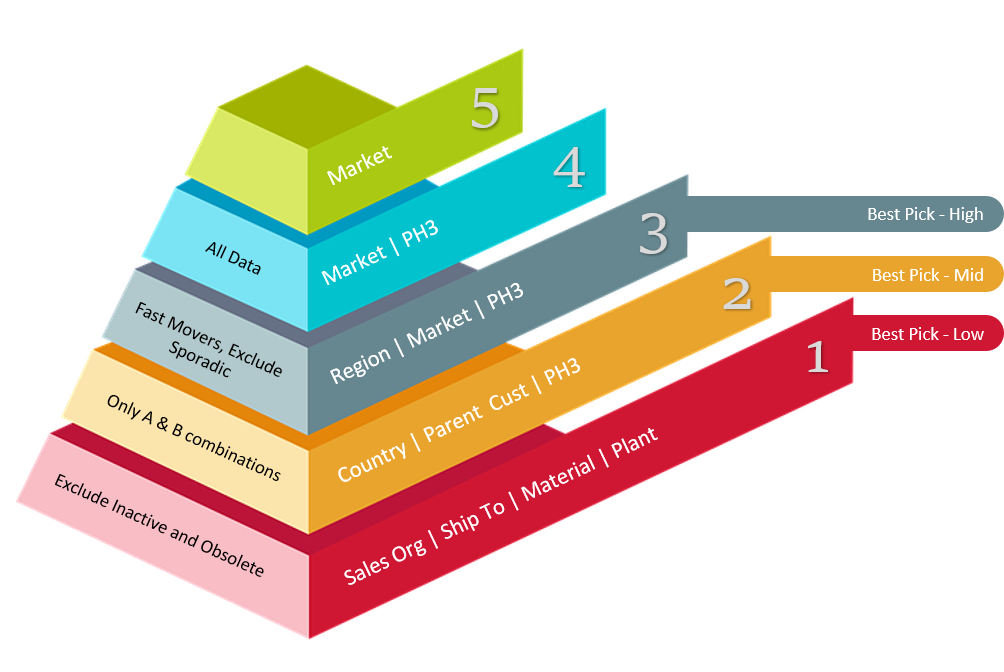
Arkieva Machine Learning uses algorithms to organize time series and combinations into different forecast-able categories.
Machine Learning Forecast runs as an unsupervised AI engine where it dynamically creates clusters using the K-means algorithm. It simulates and tests various forecast strategies (n-factorial) to identify the best pyramid for each business segment.
This system can run on the sidelines continuously from a cloud server seeking and learning to improve the forecast accuracy.

Arkieva’s Machine Learning based forecasting will afford customers a better and more accurate forecast. These results can be achieved using their existing computing power and servers. Planners need only generate the forecast for the system to select the best hierarchy and combinations of attributes.
- Improved Forecast Accuracy.
- Autonomous forecasting engine.
- Identifies hidden opportunities and strategies.
- Continuous increased revenue opportunities by minimizing error.
- Dynamic report building capability.
- Smart clustering and built-in optimization.
- No ML expertise needed to run the tool.
- No need to hire a company or consultant for AI/ML.
- No burden of buying new hardware with remote cloud solve.

Machine Learning ribbon

New
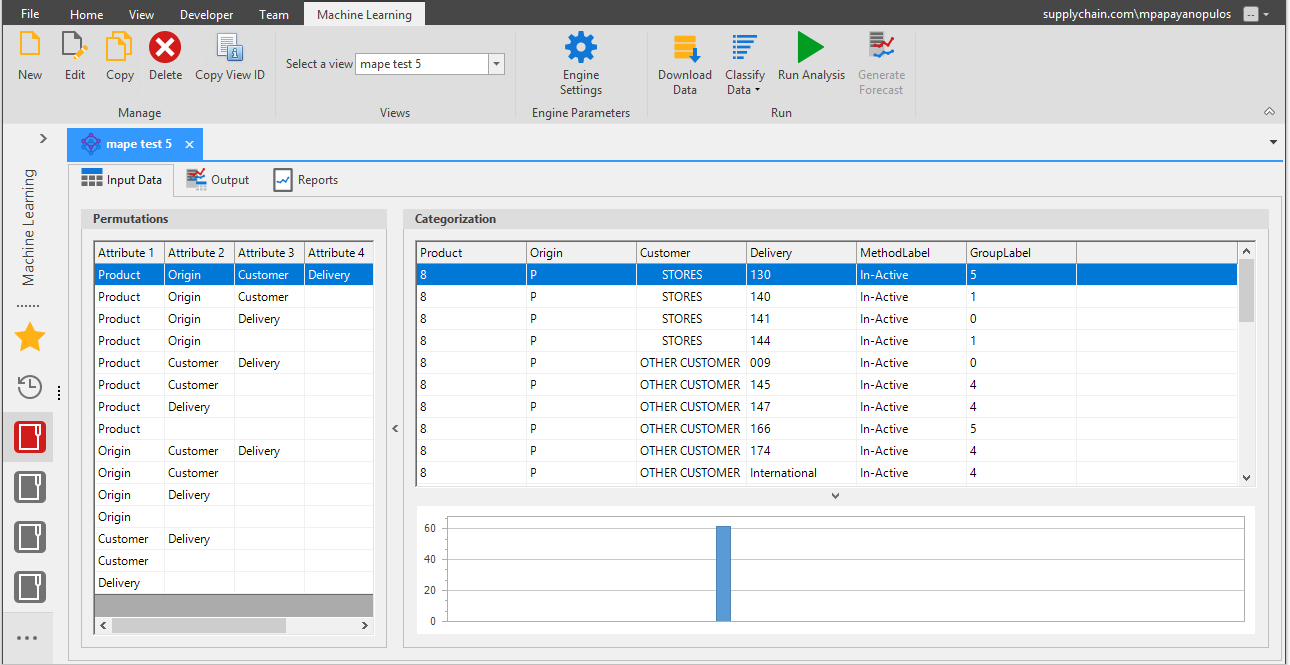
Click the New button from the Manage section of the Machine Learning ribbon to access the Machine Learning View Editor window.
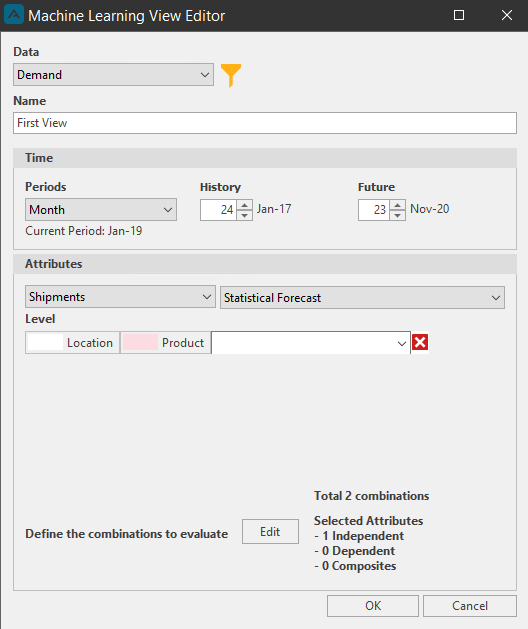
Select a Data Source from the data dropdown to populate the Time and Attribute options of the window. Then create a name for the new Machine Learning view. Next select the independent attributes. These selected attributes will become the most detailed level of the Machine Learning pyramid. Select the History, Forecast, and the Levels. Now select the time Periods and the History and Future dates to extract the data. The current period will be displayed once you make a selection for the Periods dropdown.
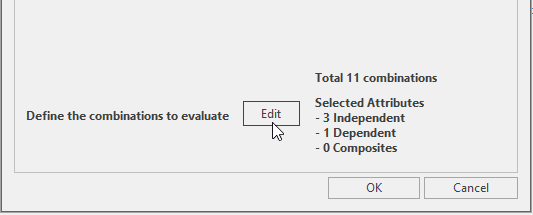
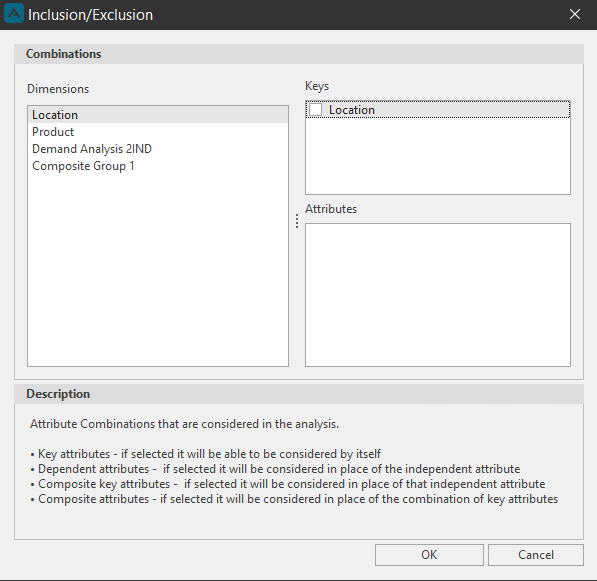
You can then define the Combinations for the new view by clicking the Edit button. Clicking Combinations will launch the Inclusion/Exclusion window. The Independent attribute(s) selected will always appear in any attribute combination unless replaced by one of its Dependent attributes. A dependent attribute selected can replace an independent attribute but an independent attribute is always accompanied by is dependent attributes.
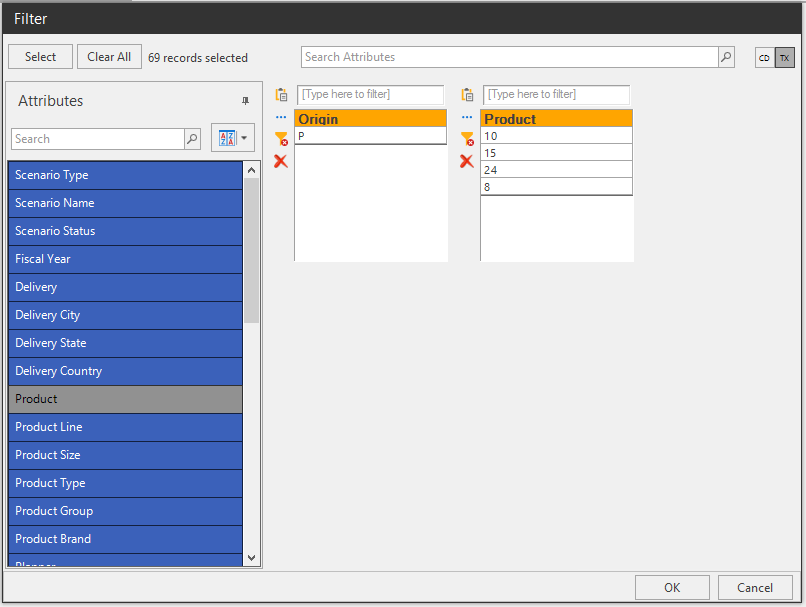
Lastly you can choose to filter the attributes selected by clicking the Funnel icon next to the Data dropdown in the Machine Learning View Editor window. Click OK to return to the Editor window, then click OK to close the Editor window and launch the new Machine Learning view.
Engine Settings
Click the Engine Settings button in the Engine Parameters section to access the Global Settings window.
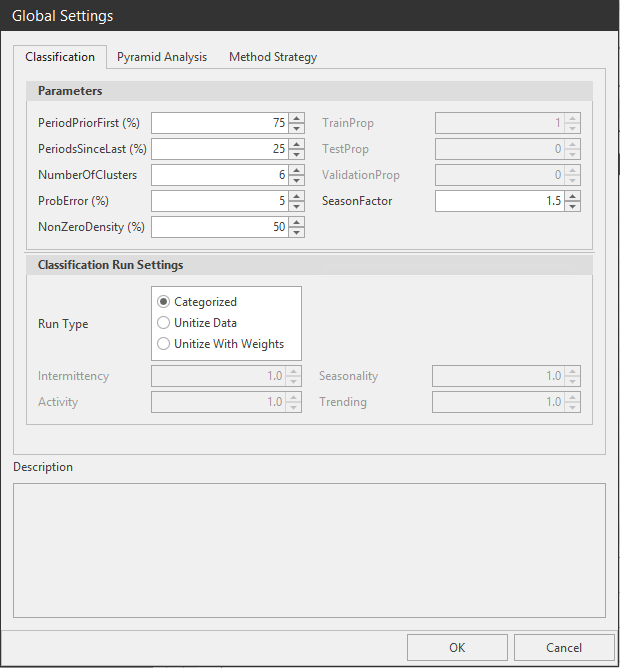
The Categorization and Pyramid Analysis settings are available in the Global Settings window.
Classification tab\ Under the Classification tab is the Parameters and Classification Run Settings.
Parameters
- PeriodPriorFirst (%): Number of periods of inactivity before first activity to declare an item a new product. Value is calculated from a percentage of the total periods.
- PeriodsSinceLast (%): Number of periods since last activity to declare an item as out of activity. Value is calculated from a percentage of total periods.
- NumberOfClusters: Number of categories.
- ProbError (%): Error of confidence, acceptable values are betweem 1-100%. The default is 5%.
- NonZeroDensity (%): Proportion on non zeros in the active period. Value is 1 to 99% with a default of 80%.
- TrainProp: Proportion of data used for training.
- TestProp: Proportion of data used for testing the trained model.
- ValidationProp: Proportion of data used for validation.
- SeasonFactor: Prioritize Seasonality, this factor is the multiple of the cycle/time level required to consider seasonality. Default is 1.5.
Classification Run Settings
- Run Type: Check Categorized to convert data to categories. Check Unitize Data for no categorization. Check Unitize With Weights to assign weights to the Intermittency, Activity, Seasonality, and Trending categories.
Pyramid Analysis tab\ Under the Pyramid Analysis tab you can access the Parameters and Search Strategy options.
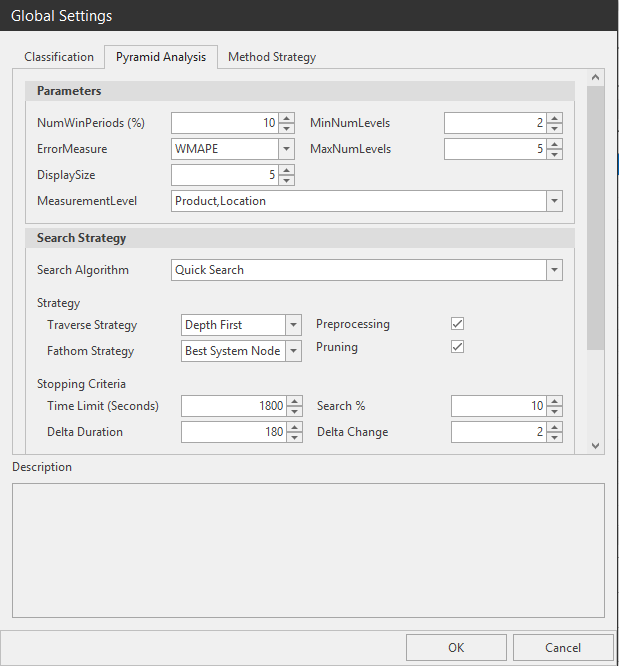
Parameters
- NumWinPeriods (%): Validation periods which is a proportion of the total number of periods.
- ErrorMeasure: Error measure used in pyramid analysis. Geometric MAPE, WMAPE, and Score Weighted MAPE.
- DisplaySize: Maximum Number of Pyramids to display. Default is 5, maximum is 10.
- MinNumLevels: Minimum number of levels.
- MaxNumLevels: Maximum number of levels.
- MeasurementLevel: Level at which constructed pyramid is measured.
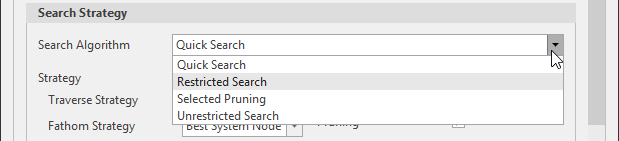
Search Strategy Search Algorithm
- Quick Search: restrict search only to improving pyramids from lower level to higher level.
- Restricted Search: A proportion (using search % but no more than 100 pyramids) of the best pyramids at the current level would proceed to next level.
- Selected Pruning: Prune down the number pyramid based on the likelihood that a better pyramid would be generated, then select only the best proportion for evaluation.
- Unrestricted Search: No limitation for search strategy (slowest option and usually used for small data sets only).
- Strategy: Make selections for the Traverse and Fathom Strategies. Traverse meaning how we move through the solution space. For Traverse you can select Depth first (construct a full pyramid first), Breath First (construct pyramid one level at a time), or Hybrid Priority (based on adding a level to current best pyramid). Fathom strategy determines when a path is blocked. We compare the current node to existing node. Decision is made whether to continue the path on the current node. For Fathom you can select Best System Node (the best pyramid node in the system is compared to the current node, if the Best node is a better node than the current node the path of the current node is blocked), None (no comparison node required; the only blocking decision is when the pyramid has the maximum number of level allowed), or Parent Node (the parent node is the node that generated the current node, if the parent is a better node than the current node the path of the current node is blocked).


- Preprocessing: Redundant combinations are removed from the list of attributes.
- Pruning: Prune the candidate attribute for the next level. Select on the once that have the potential of improving the search results.

Stopping Criteria\ When condition for any of the stopping criteria is met. The engine would stop and generate the best Pyramids.
- Time limit (in seconds): Maximum possible duration for finding the best pyramid. The run stops when this limit is exceeded. From the example , the run is stopped at 1800 secs or 30 mins.
- Search % (in percentage): Maximum number of pyramids that can be searched. When the limit is reached the search stop. From the example above, only 10% of the total search space is searched for the best solution.
- Delta Duration (in seconds): This is the limit since the last improvement. Once an improvement is detected it is reset to the beginning. From the example, if no new solution is found within 180 secs(3 mins) the search is abandoned.
- Delta Change (in percentage): Percentage change in number(in percentage) of pyramids constructed since the last change in solution. Once an improvement is detected it is reset to the beginning. From the example, if there are 1000 possible pyramids and then there is no change in solution after constructing 2%percent( i.e. 20 pyramids) of pyramids the search is abandoned.

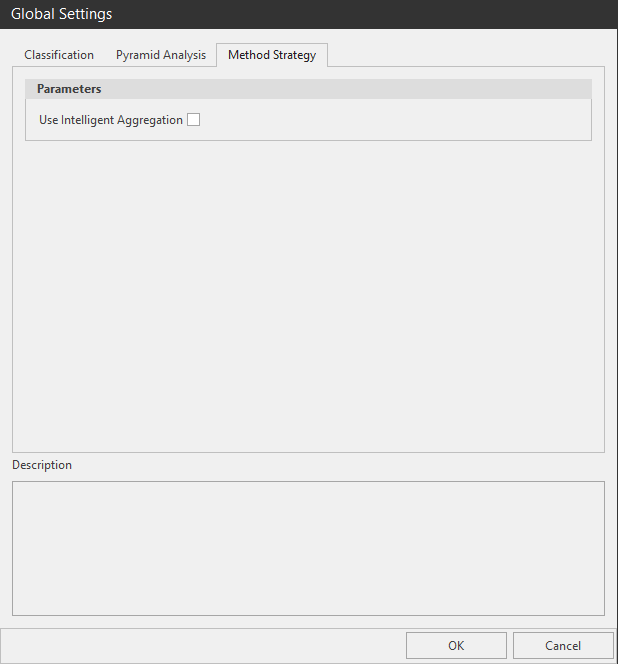
Method Strategy\ Intelligent Aggregation: Intelligently determines when to implement aggregation strategies and which aggregation strategies to use for a given time series. Aggregation is the process of combining results from several time series methods to produce a better forecast.
Basics of Machine Learning
Understanding the impact of advanced machine learning in forecasting demand.
{`
`}
{`
`}
Trend Score
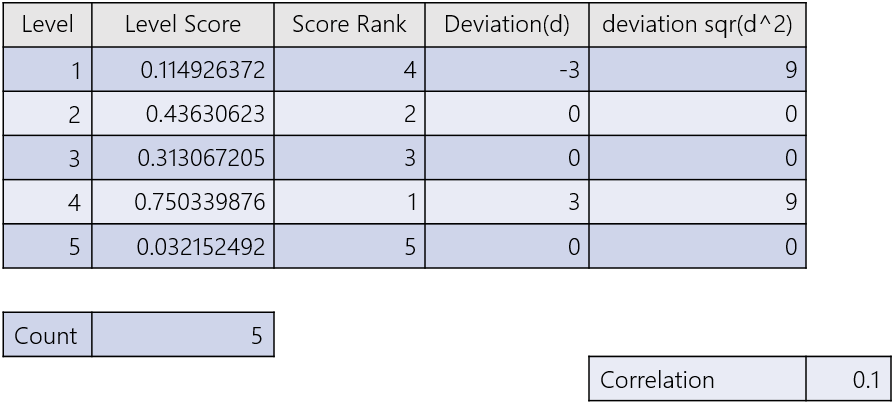
Trend Score measures the strength of the trend from the lowest to highest levels. It provides a sense of whether the pyramid is improving from the lowest level to the higher levels.
Steps
- Rank the level scores from the largest to the smallest (largest value gets the lowest rank).
- At each level find the difference between the level sequence and the rank.
- Square each of the deviations.
- Sum the square deviations.
- Use the formula for the final step:
Where d deviations at each level and n is the number of levels.
- Priority: If search percentage is 100% then prioritization is not important. Otherwise we have 2 options.
- Pruning: there are Pyramids that are not likely perform well, we want to recognize those pyramids and drop them from consideration. This reduces the search space for the best pyramid. There are 2 pruning options
- Option 1: pruning involves having higher level measure must be an improvement over adjacent lower level score. If any adjacent level does not meet this condition the pyramid is dropped from considering.
- Option 2: pruning involves have higher level measure must a smaller number of items that adjacent lower level count. If any adjacent level does not meet this condition the pyramid is dropped from considering.
After Pruning the rest of the pyramids are prioritized. Prioritization uses the Trend score and the number of levels in a pyramid. If 2 pyramids have the same Trend score, then the pyramid with the smallest number of pyramids would have the higher priority.
After pruning, trend score in calculated and then sorted from the highest to the smallest. The search % is used to select a proportion of the pyramids with the best trend score are selected.
Related Articles
Machine Learning Composite Attributes
? Composite Attributes Composite Attributes are attributes that are used to define a relationship between two or more key attributes. If all keys in the composite types appear in an attribute combination then all those keys are replaced with ...Release Matrix
? Release Schedule Arkieva releases are quarterly: February, May, August, November. Demand Planning Feature 5.22 5.21 5.20 5.19 5.18 Anomaly Component Forecast Methods Machine Learning Link Promotion Planning Link Link Link Segmentation Link Link ...Arkieva Customer Training Program
The Arkieva Customer Training Program is a customer-centric program aimed at empowering Arkieva customers with the knowledge and skills needed to harness the power of their Arkieva solution to solving complex business problems. ? Go to the bottom of ...Data Anomaly Detection
Why Detect anomalies? Anomaly detection refers to the problem of finding patterns in data that do not conform to expected behavior. In the domain of supply chain management (SCM), anomaly detection is a key factor in making better forecast decisions. ...Demand Planning Introduction
The Demand Planner creates a collaborative demand planning process for a cross-functional demand planning process for working towards one common goal. Benefits of the Arkieva Demand Planner Solution: 15% less inventory 17% higher perfect order ...