Practical Applications
Setting Up Forecast Templates
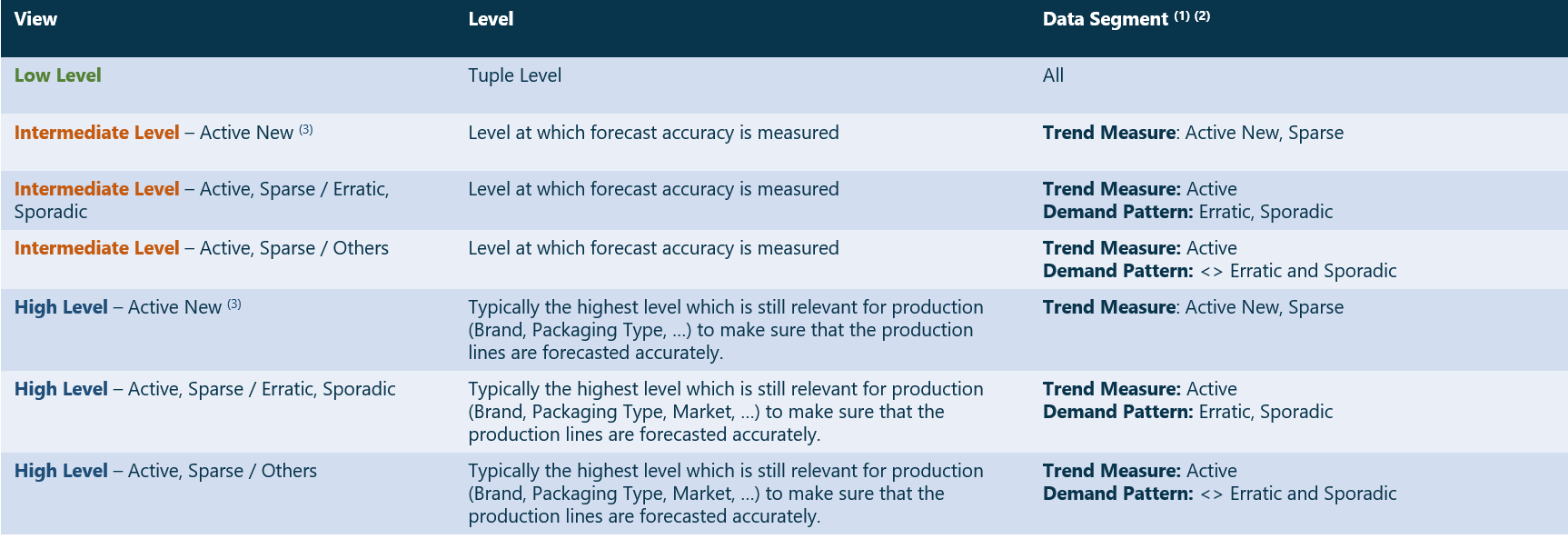
Setting up Forecast Views\ Each attribute which is used to determine the data segment should be calculated at the corresponding level. In this case, two Trend Measure attributes need to be in the system.
Other attributes (provided by the customer) can be used to filter the views as well. Typically, there is a material status flag or life cycle flag attribute available in ERP. For forecasting, we would restrict the obsolete/not to forecast items in the Low and Intermediate level but keep them in at the High level to make sure that we do not miss volume at the higher level.
Sometimes, we also exclude these items in the High level because we assume that if the volume on the delisted item is relevant for the Brand, the users would have realigned it. If not, it means that this item is not substituted and hence we should not allow Arkieva to generate forecast out of it. In other cases, customers can provide a policy status (MTO, MTS, Forecast, …).
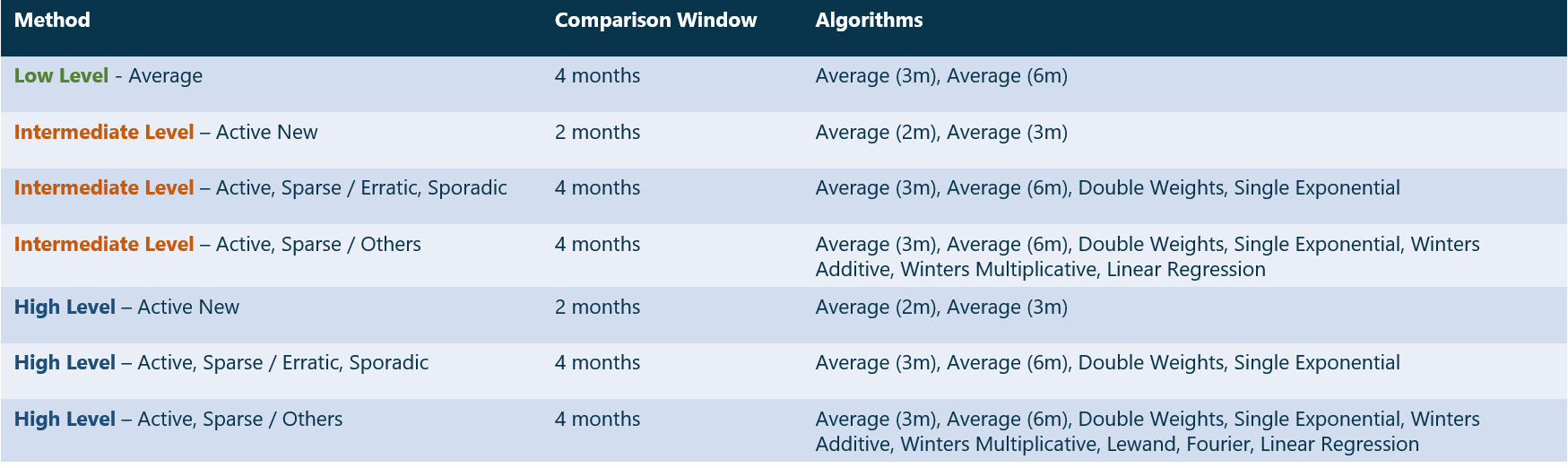
In the views where we focus on Active New Trends, we would recommend using a horizon that only looks at the past 6 months.
Setting up Forecast Methods
Generate the Best Possible Statistical Forecast
Get to understand the ways to generate the best possible statistical forecast for your business.
{`
`}
Discover the latest additions to the Statistical Forecasting module
Explore recent improvements made in your stats forecasting module with the latest solution release. New additions include solutions as pick the best method, smart selection, etc.
{`
`}
Related Articles
ATP, AATP, CTP and PTP
Available-to-Promise, Able-to-Promise, Advanced Able-to-Promise, Capable to Promise, Profitable to Promise: all are catch phrases describing different offerings that support the order commitment process. Such a proliferation of jargon makes it harder ...Forecast Performance Management
“What gets measured, gets managed.” There are a many alternatives on how to measure forecast accuracy. It does not matter too much how you define the KPI as long as: it is consistent, and it is understood by all stakeholders. Therefore, choose a set ...Insights
The following serves as an introduction of how the Arkieva Insights software can be implemented as part of a multinational’s IT landscape. This is intended for IT project managers that are planning or considering the implementation of Arkieva ...Calendars
Introduction Collaborative, Secured Item, and Resource Calendars\ Arkieva has three calendar types: Collaborative, Secured Item, and Resource. Collaborative: users can create calendars to share with other users on the database. Secured Item: users ...Forecast Method Parameters
Each Forecast Method has unique parameters. The following are the definitions for each parameter included in the system: Alpha Affects the estimate of the intercept. Arima ArimaD: Number of times to difference the series. ArimaP: Autoregressive ...