How Data Flows in Arkieva's Planning Environment
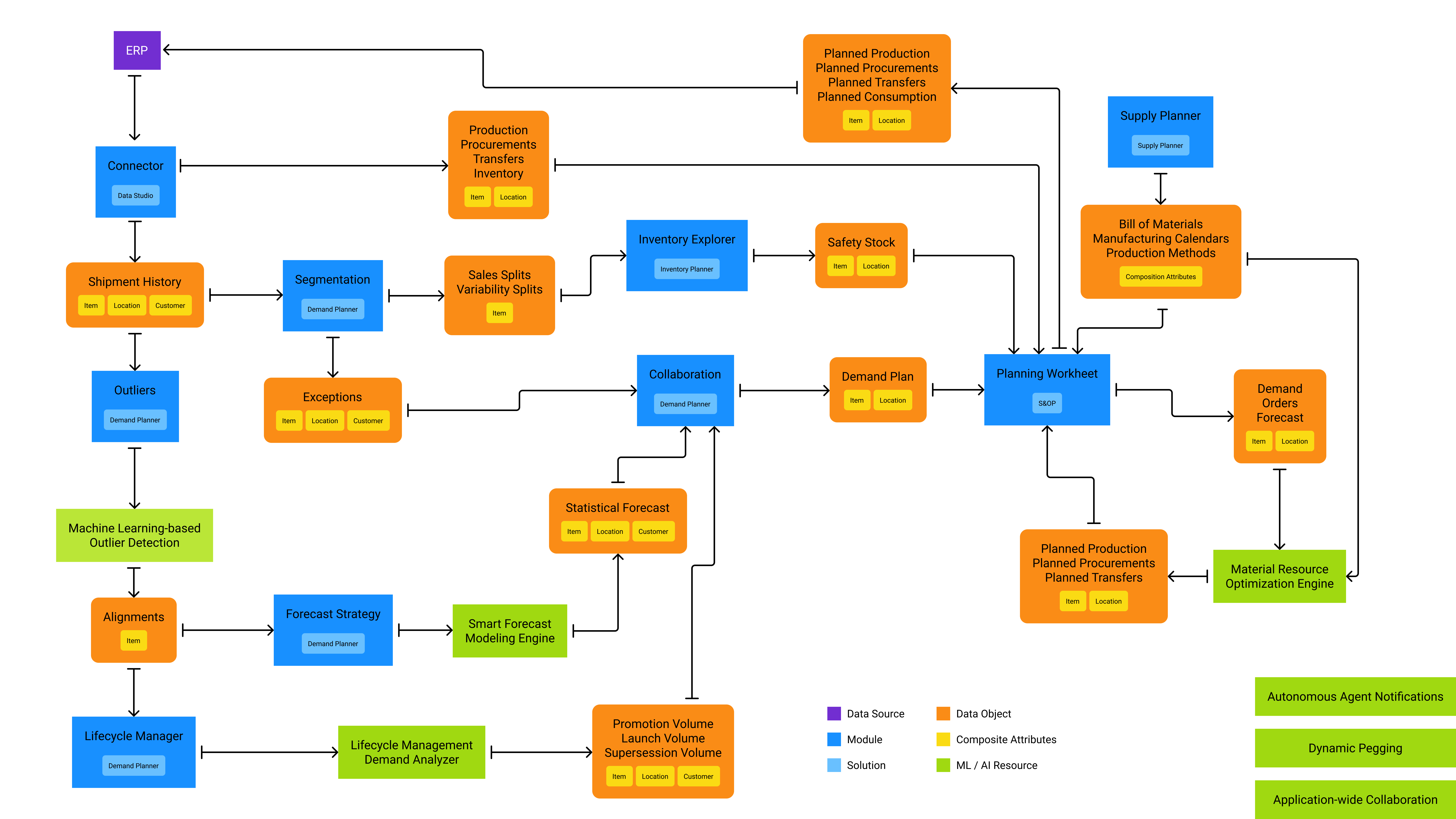 Data flow diagram
Related Articles
How Data Flows Inside Arkieva
This flow chart shows how Arkieva ingests ERP data and how it's used throughout the application.
Planning Objects
Manage the data objects available in S&OP from the Planning Objects section of the Settings module. Add New Planning Objects To add a new Planning Object for S&OP, first click the + Add New button. The Add Planning Object drawer will slide out. Under ...
Planning Worksheet
The supply planning process involves the delicate art of balancing unconstrained demand forecasts with organizational constraints like people and resources. Balancing or creating a supply plan is done either by (a) Production - manufacturing the ...
Planning Period
Change the period that is displayed by default within the system. Change planning period start date To change the planning period start date, first selecting a beginning planning period from the dropdown. Then select a planning horizon strategy from ...
S&OP Views Configuration
What are S&OP Views? A view describes the type of data that you want to see in the worksheet. Each type of data is displayed in a row. For the S&OP Worksheet, each row of the worksheet represents a Planning Object. The view describes the set of ...