Lifecycle Manager: Event Realignment
This article is part of the Lifecycle Manager series, split from the original Lifecycle Manager article.
New Event Realignment
Realignments with Specified Start Date
This method allows you to set up a future or historical realignment of replacing one item with another without knowing the exact date, but with an expected start date. The system will move the forecast if Item 1 to Item 2 for periods after the Start Date. This will ensure visibility for the supply team that at some point the volume will be moved to Item 2. Setting a Start date in the future will create a Future realignment, setting a Start date in the past will create a historical realignment.
Introduction of new demand type realignment volume should be recalculated every statistical forecast run, update of life cycle manager data or update of input data. Below is the formula and updated calculation of statistical forecast including events:
Realignments with calculated start date by inventory
Checking this box indicates to the system to create a realignment after the inventory is depleted.
At some point, your manufacturing team will notify you that they will not produce item 1 anymore. You may want to deplete the inventory of item 1 in every location and then start planning item 2. The system will automatically calculate as of when the forecast should be moved to item 2 based on the inventory if item 1. This will provide accurate visibility for the manufacturing team as of when to start producing item 2. If the forecast or inventory is changing, this will be automatically impacting this calculation.
Introduction of new demand type realignment volume. Below is the other formula for realignment volume in case the checkbox “calculate start date based on inventory” is checked.
Delete Overrides checkbox
Check this checkbox to remove all older overrides on Sales Forecast and Demand Plan combinations from the realignment date going forward.
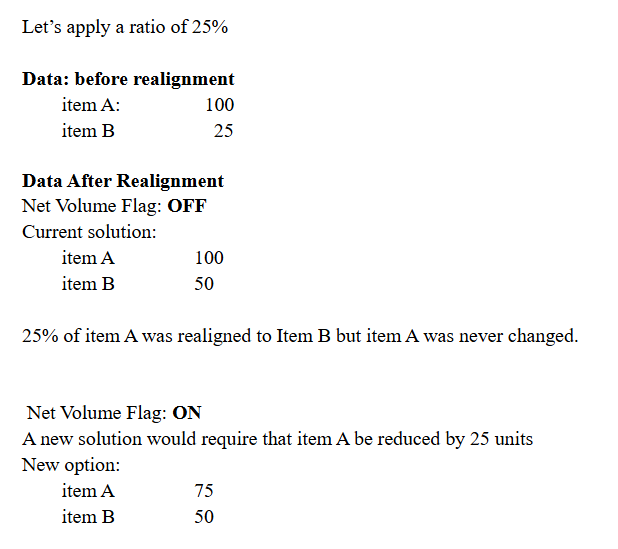
Net Volume
Check the checkbox to create a Net Volume realignment.
Example of Net forecast Calculation:
Lifecycle Manager series