Data Download Process
Data Download process data is downloaded from the ERP and exposed to Arkieva.
The Data Download business process loads the ERP data needed in the Supply Planning process, then the data is transformed to the format needed in Arkieva.
Figure 1. Process Overview
The Download Data business process contains 3 steps:
Figure 2. Process Overview – Download Data
Implementation
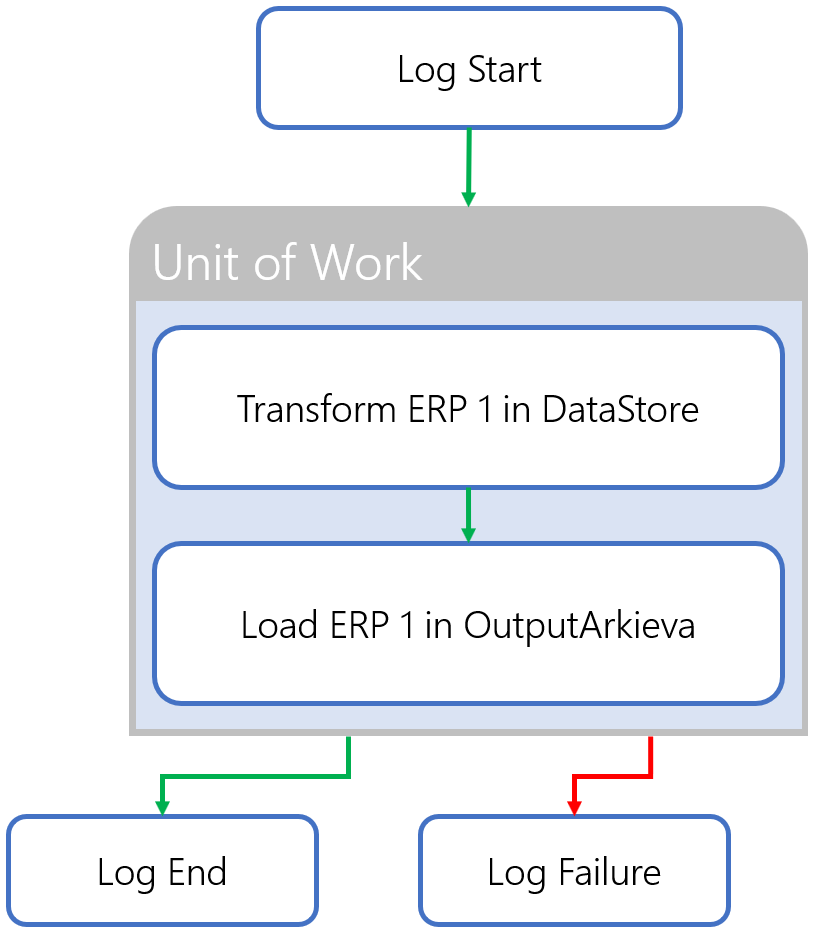
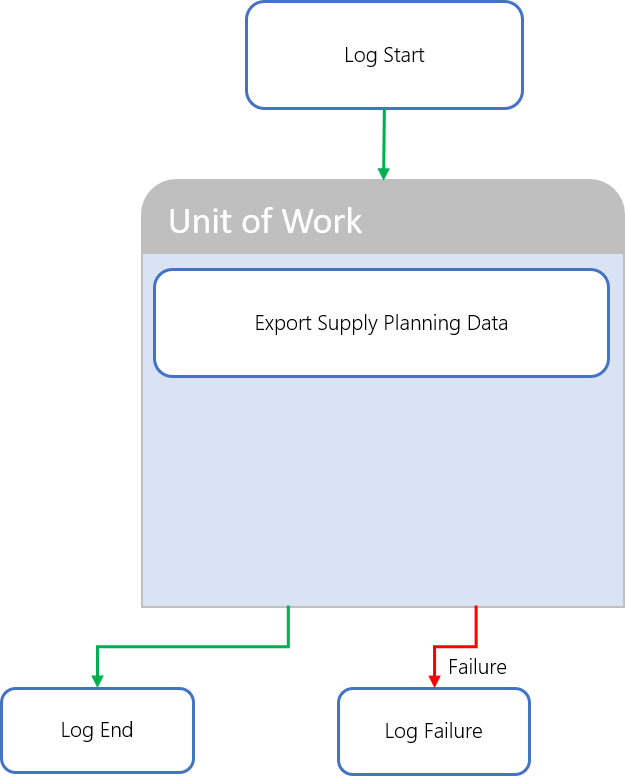
Implementation is a process used by the Arkieva Connector, which generates an SSIS package to execute the process. The package is then scheduled to be executed each day.
Figure 3. Process Overview – Example of the Download Data Configuration process
Download ERP Data to DataMart
This step loads the data from ERP into the staging area of the DataMart. The staging step is generated based on templates, which are then extended with additional tables and/or fields. Each template groups table information regarding a specific information object in ERP. The following templates are selected:
- Batches
- Bill of Material
- Customer
- Delivery Orders
- Material Document
- Material Master
- Planned Orders
- Plant
- Process Orders
- Product Hierarchy
- Purchase Orders
- Sales Orders
- Vendor
In addition to the selected templates the following information objects are also downloaded from ERP:
- Addresses
- Purchase Requisitions
- Text Data
Implementation
In the Arkieva Connector the download of each information object is grouped into a separate ETL package, which are then executed from within the staging step.
Addresses
Address data is not available in a standard template, so this information is added by manual configuration in the Arkieva Connector.
Batches
Batch data is a standard template. Batch data is downloaded incrementally to limit the amount of data extracted from ERP. The initial download date is set to 2001-01-01, and the increment is set to 2 weeks.
Bill of Material
Bill of Material data is a standard template. Bill of Material data is downloaded incrementally to limit the amount of data extracted from ERP. The initial download date is set to 2001-01-01, and the increment is set to 2 weeks.
Customer
Customer data is a standard template. Customer data is downloaded with full table downloads.
Delivery Orders
Delivery Orders data is a standard template. The below table contains the standard fields in the template. Additional fields are added.
The main tables of Delivery Orders data are downloaded incrementally to limit the amount of data extracted from ERP. The initial download date is set to 2017-01-01, and the increment is set to 2 weeks. The status tables are download by using Table Join queries.
Material Document
Material Document data is a standard template. The below table contains the standard fields in the template. No additional fields are added. Material Document data is downloaded incrementally to limit the amount of data extracted from ERP. The initial download date is set to 2017-01-01, and the increment is set to 2 weeks.
Material Master
Material Master data is a standard template. The below table contains the standard fields in the template. Additional fields are added. The tables of Material Master data are downloaded with full table downloads.
Planned Orders
Planned Orders data is a standard template. Planned Orders data is downloaded with full table downloads.
Plant
Plant data is a standard template. Plant data is downloaded with full table downloads.
Process Orders
Process Orders data is a standard template. The below table contains the standard fields in the template. No additional fields are added. The main tables of Process Orders data are downloaded with full table downloads. The status tables is download by using a Table Join query.
Product Hierarchy
Product Hierarchy data is a standard template. Product Hierarchy data is downloaded with full table downloads.
Purchase Orders
Purchase Orders data is a standard template. The tables of Purchase Orders data are downloaded with full table downloads. All tables have a where clause to limit the amount of data downloaded each time.
Purchase Requisitions
Purchase Requisition data is a standard template. Purchase Requisition data is downloaded with full table downloads.
Sales Orders
Sales Orders data is a standard template. The main tables of Sales Orders data are downloaded incrementally to limit the amount of data extracted from ERP. The initial download date is set to 2017-01-01, and the increment is set to 2 weeks.
The tables are downloaded with full table downloads. Additionally the table has a where clause to limit the amount of data downloaded each time. The status tables are download by using Table Join queries.
Text Data
Text data is not available in a standard template, so this information is added by manual configuration in the Arkieva Connector. The below table contains the selected tables and fields that are added manually. Both have a where clause to limit the amount of data downloaded each time.
Vendor
Vendor data is a standard template. Vendor data is downloaded with full table downloads.
Transform Data inside DataMart
This step transforms and prepares the previously loaded data inside the DataMart.
Functionally the following information is prepared and used afterwards by the Supply Planning business process:
- Item Master
- Item Location
- Bill of Material
- Plants
- Location Master
- Vendors
- Customers
- Customer RDC Mapping
- Confirmed Demand
- Contract Orders
- Inventory
- Planned Orders
- Production Orders
- Purchase Requisitions
- Stock Transfer Orders
- In-Transit Inventory
- Shipments
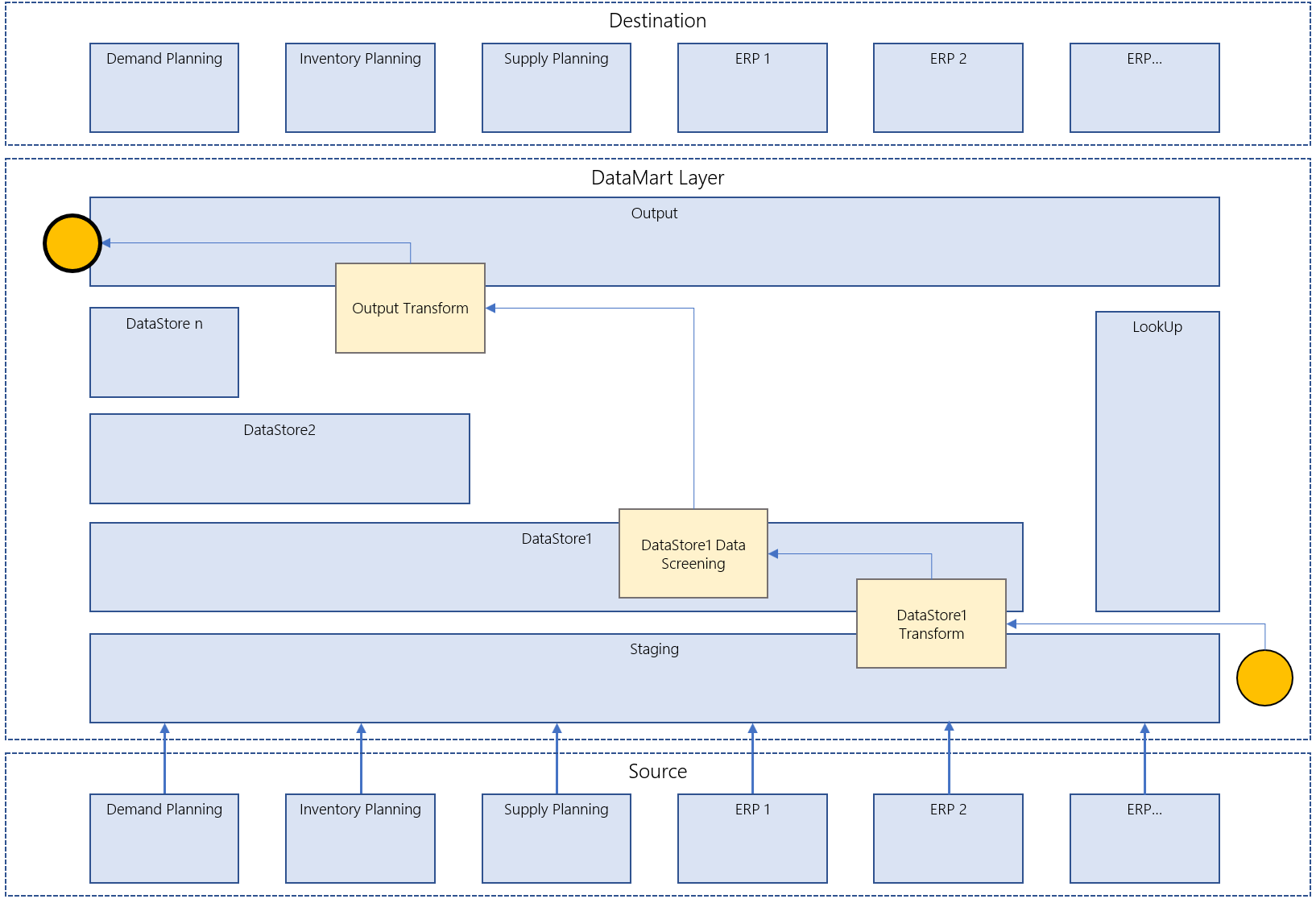
The following picture illustrates the dependencies between the loaded master data and the resulting prepared and enriched information.
Figure 5 ETL Overview – Transform Data inside DataMart
For each information object at least, the following steps are used:

The following picture puts the above steps on top of the layered architecture of the DataMart, as described in the Software Architecture Document.
Item Master
The material information available in ERP is enriched with the address information. Only material information of a specific Material Type is selected. Also, some other country-specific filters are applied.
Currently only one specific data quality screening has been defined on DataStore[Country]1.ItemMaster.
- External Material Group is a required field: this data quality screening tests if a value has been supplied or not. If not, it tags the whole row (Has Data Quality Issues = 1)
In a next step palletization data is transformed. Only palletization data of a specific Warehouse and Plant is selected.
Currently only one specific data quality screening has been defined on DataStore[Country]1.ItemMaster.
- External Material Group is a required field: this data quality screening tests if a value has been supplied or not. If not, it tags the whole row (Has Data Quality Issues = 1)
In a next step palletization data is transformed. Only palletization data of a specific Warehouse and Plant is selected.
Bill of Material
The bill of material information available in ERP is enriched with the address information. Only BOM Usage equal to ‘1’ and BOM Statuses equal to ‘01’ are selected.
Plants
The plant information available in ERP is enriched with the address information. No further filtering is applied.
Location Master
The storage location information available in ERP is enriched with the plant information. No further filtering is applied.
Vendors
The vendor information available in ERP is enriched with the address information. Only vendors of a specific Vendor Account Group are selected.
Customers
The customer information available in ERP is enriched with the address information. No further filtering is applied on the available customer information.
Customer RDC Mapping
The customer sales information available in ERP is enriched with the customer information and the plant information. Only customer sales information of a specific Sales Organization and Distribution Channel are selected.
Upload Data to Arkieva
Related Articles
Data Pipeline
Data Pipeline was created as an Arkieva Add-in Component as an alternative to Data Canvas to better handle importing large Excel files into an Arkieva database in a much shorter time. Data Processing Data Import Selection and Load Import File To ...Data Versions
Data Versions define and manage alternative data sets. Business What-Ifs require comparison between alternatives. Each alternative is defined by a set of business rules and a set of data. Data Versions can be accessed from the Linear Programming (LP) ...Data Canvas
Introduction Data Canvas is an easy way to edit table and data source data in a Grid and Spreadsheet view. Select the source of the data, Table Editor or Data Source, to create a Data Canvas. A table or a data source must first be created before the ...Filtering Data
Introduction Create filters to drilldown data, place conditions on data, and prioritize viewable data. Various filter options are accessible through the Design, Filter View, and Results View. Below are a few examples of where you can find the Arkieva ...Data Anomaly Detection
Why Detect anomalies? Anomaly detection refers to the problem of finding patterns in data that do not conform to expected behavior. In the domain of supply chain management (SCM), anomaly detection is a key factor in making better forecast decisions. ...